


- Shop
- About us
- DSLocate App
- Your industry
- FAQ
- Contact
-
Monitoring for
 sales representatives
 service technicians
 delivery drivers
 vehicle rental companies
 distributors
 construction machinery
 forklifts
 waste containers
 agricultural machinery
 trailers
 refrigerated vehicles
 municipal vehicles
 trucks
 buses
buses boats
boats people and objects
 theft protection
 mobile objects
Guide series | DSLocate – interesting and useful features you may not have known about | #5 Remote tachograph download

Managing a vehicle fleet is no small undertaking. Service schedules, technical condition checks, driver working hours monitoring — these are just some of the responsibilities that fall on the shoulders of transport and logistics company owners. Fortunately, DSLocate is here to help — a modern application that significantly simplifies all of these tasks.
Of course, the primary function of DSLocate is real-time vehicle tracking. But that is just the beginning! The application offers many other, lesser-known but enormously useful features that can significantly streamline fleet management. In this series of blog articles, we will discuss how DSLocate can optimise your operations even further.
In today's article, we will focus on the remote tachograph download feature, which can prove to be a very useful tool in your daily work.
Remote tachograph download — complete control over driver working hours and regulatory compliance
Remote tachograph download is a detailed and convenient tool that enables the remote retrieval of DDD files from both tachographs and driver cards, without any need for physical access to the vehicle. DSLocate automatically records all data, such as driver working hours, breaks, and distance covered, providing complete control over regulatory compliance. With this feature, you know exactly how and when your drivers are performing their duties, and you can be confident that the data is up to date and securely stored.
Furthermore, DSLocate is fully compatible with the new second-generation tachographs, ensuring ongoing compliance with the latest European regulations. Automatic synchronisation and data retrieval enable quick and efficient management of driver working hours without unnecessary downtime or the need to visit vehicles in person.
With this feature, you not only save time, but also minimise the risk of reporting errors, which translates into better planning, operational efficiency, and resource optimisation across your fleet.
But how does it actually work?
To enable remote data retrieval from the tachograph, an installer must connect the DS/1TACHOTEL GPS tracker to sockets C and D of the tachograph. It is also necessary to provide Data System with a duplicate of the Company Card, which will be placed in a card reader in a secure server room. The remotely downloaded files are then made available within the DSLocate application on the user's individual account.
A remote download can take place while the vehicle is moving or stationary, provided the ignition is on. The procedure is quick, secure, and requires no involvement from the driver, making it considerably more convenient than manually reading data from the tachograph.
Once the DS/1TACHOTEL tracker has been installed and connected to the tachograph, the user additionally gains access to real-time vehicle location data as well as information such as fuel level, engine RPM, and accelerator pedal pressure. All of this data is available within the DSLocate application on both smartphones and computers.
In addition, the DS/1TACHOTEL tracker holds certification from the National Revenue Administration, meaning it allows road toll journeys to be settled under the e-TOLL service, and also enables the SentGeo service to be activated — allowing several functions to be handled from within the single DSLocate application.
How to download DDD files from the tachograph
Using the remote DDD file download in DSLocate is, in practice, very straightforward.
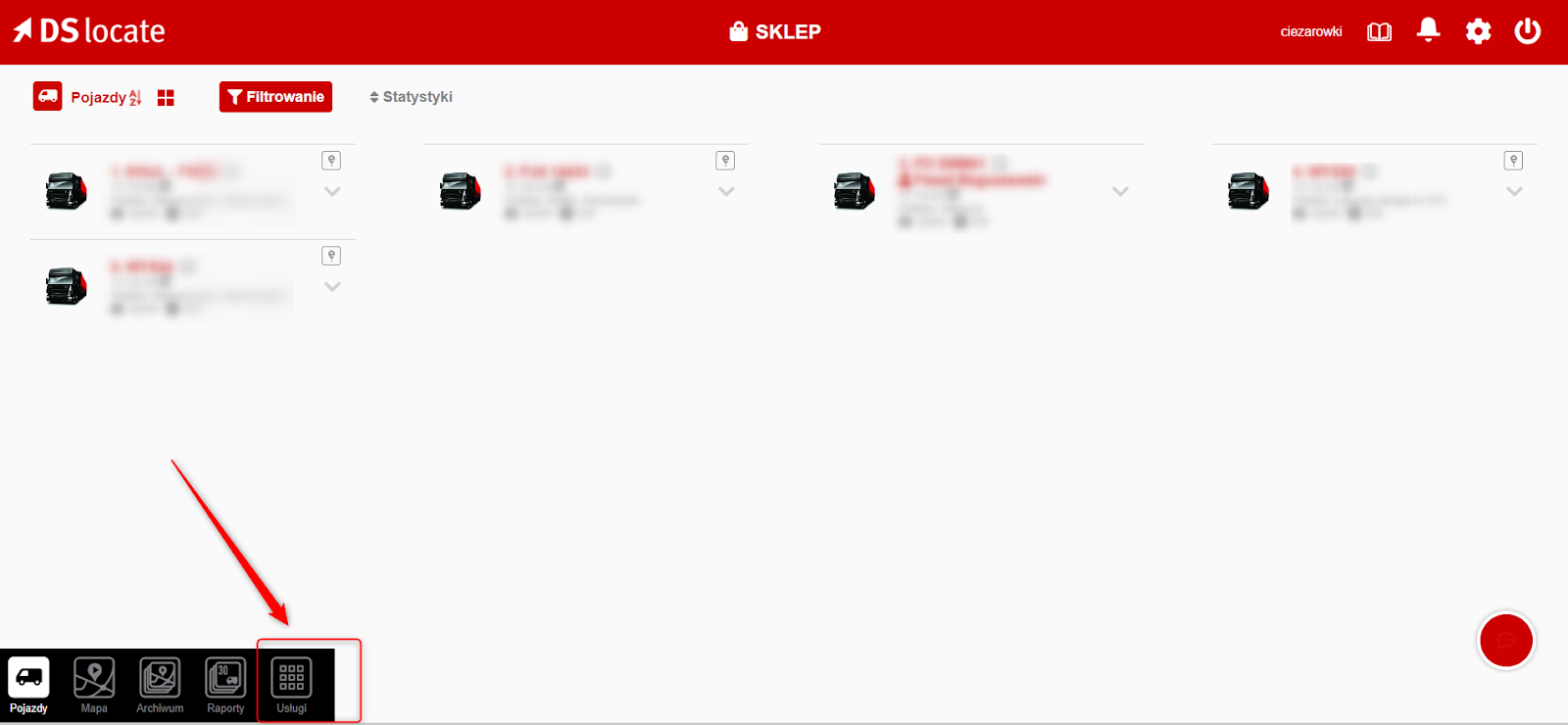
1. First, navigate to the “Services” tab.
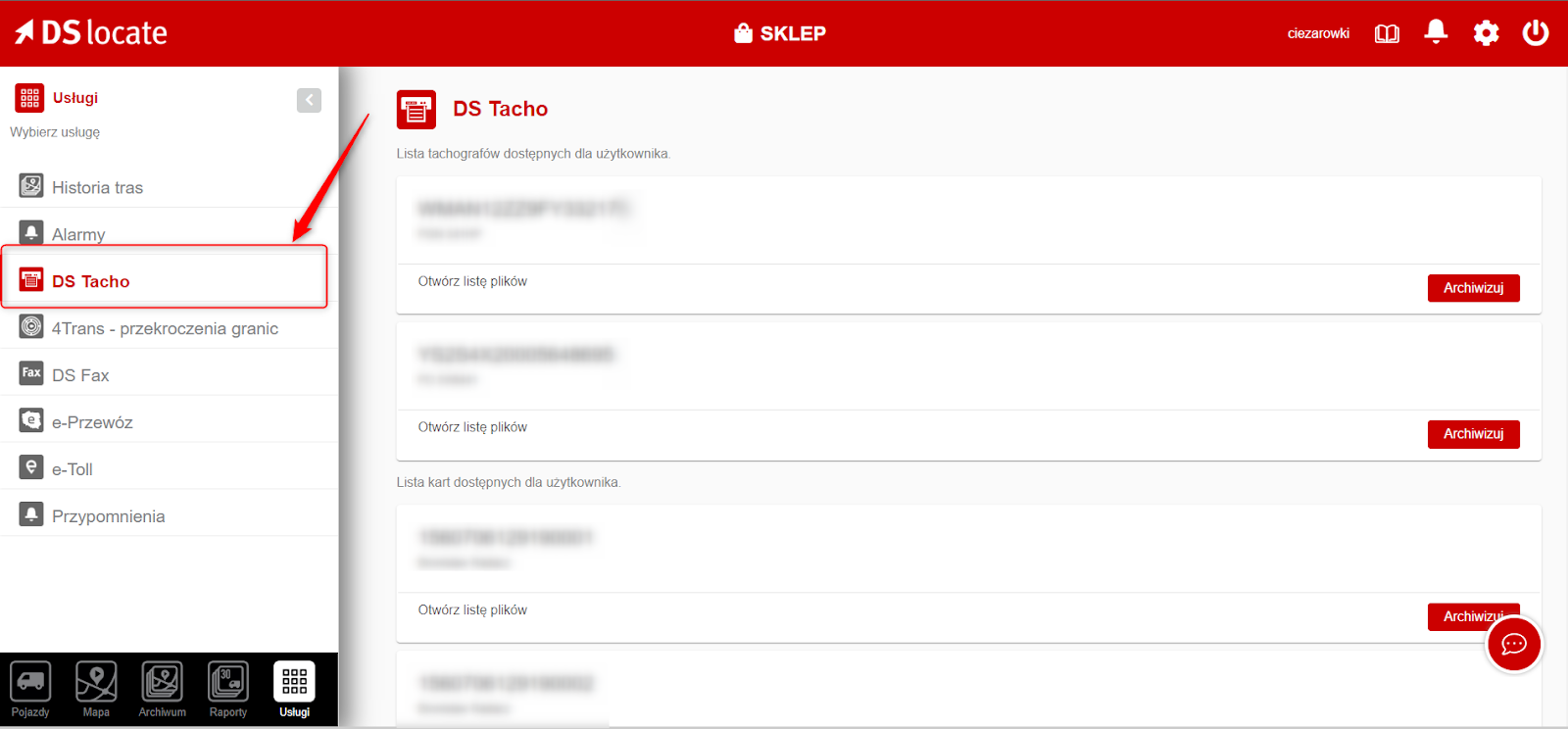
2. Next, select the “DS Tacho” tab from the left-hand panel — and that is essentially it. You are now presented with a list of tachographs and the drivers whose cards have been read.
3. All that remains is to select the vehicle or driver you are interested in and download the relevant DDD file for your chosen date.
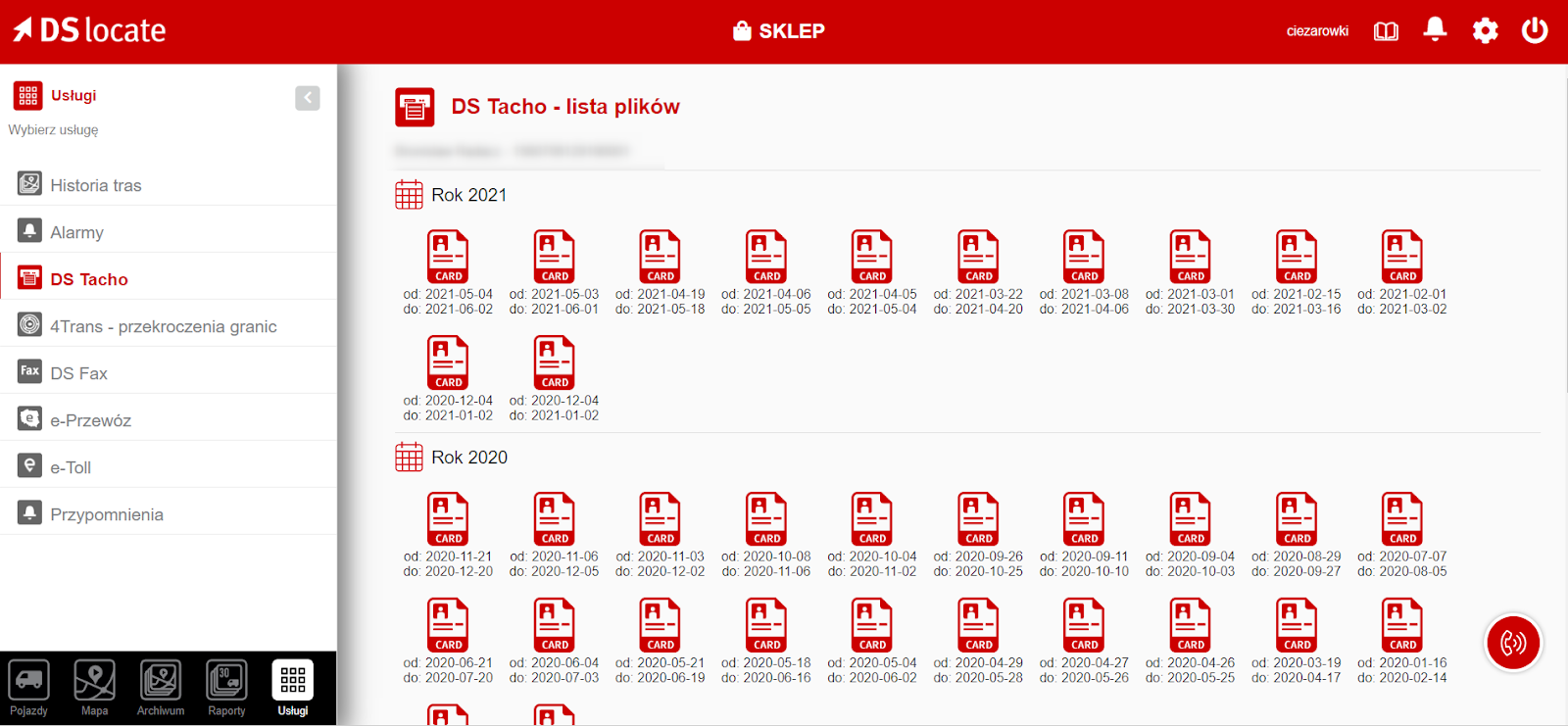
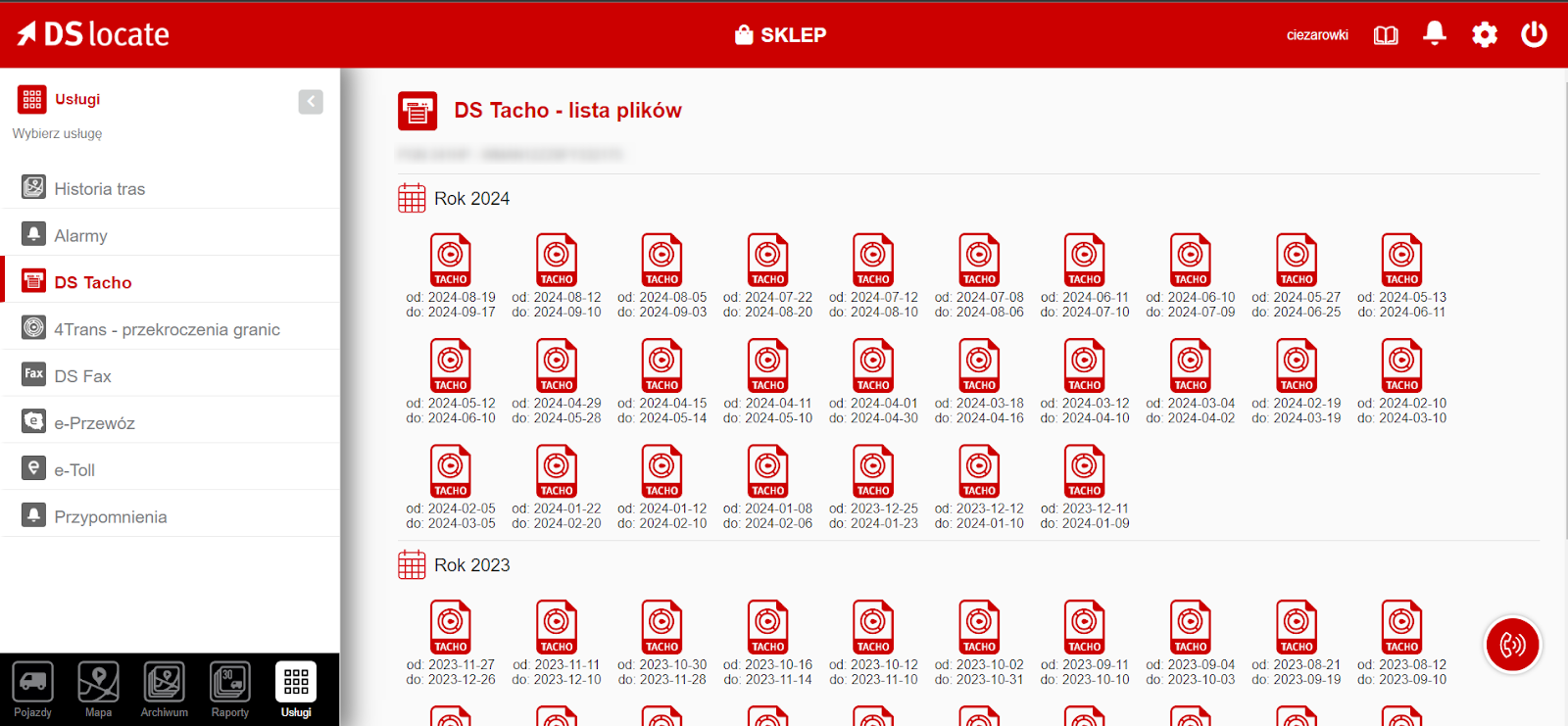
And… we have done it! Congratulations — quickly, smoothly, and without any downtime, you have downloaded the DDD files for your drivers and vehicles.
Why do you need remote digital tachograph file downloads?
1. Time savings: Remote download eliminates the need for the driver or company owner to be physically present in order to retrieve data from the tachograph. This saves time that would otherwise be spent on travel and the administrative formalities involved in transferring data.
2. Regulatory compliance: Remote tachograph file downloads help businesses maintain compliance with legal requirements. Tachograph data must be downloaded at least once every 90 days, whilst driver card data must be read every 28 days.
3. Data archiving in accordance with regulatory requirements: Data downloaded from tachographs must be stored simultaneously in two different locations. One location is provided free of charge by Data System on its own servers (accessible via the DSLocate application), and the second is the client's own computer, to which the files have been imported.
4. Real-time data access: Remote download enables ongoing monitoring of driver activity, which can help to ensure road safety and compliance with driving and rest time regulations.
5. Importing tachograph data into specialist software: Based on data from the tachograph and the Border Crossing Report available in the DSLocate application, it is possible to automatically calculate driver subsistence allowances for each EU country (using the SuperTacho application at www.supertacho.pl).
6. Automation and efficiency: Remote tachograph file downloads facilitate the automation of fleet management processes. This enables better route planning and driver activity monitoring, leading to greater operational efficiency.
7. Faster problem resolution: Real-time access to tachograph data allows potential issues relating to regulatory compliance or driver irregularities to be detected and resolved more quickly.
DSLocate — more than just location tracking
The remote tachograph download module is just one of the many advanced features our system offers. DSLocate is not merely a vehicle location tracking tool — above all, it is a comprehensive assistant that will help you manage your fleet in a more efficient, compliant, and safer way. Features such as remote tachograph download allow you to save time, minimise the risk of errors, and plan your fleet operations even more effectively.
We encourage you to try DSLocate and explore all of its possibilities. Contact our team for more information or to arrange an application demo.
In the upcoming articles in this series, we will take a closer look at other interesting DS Locate features that can significantly improve the management of your fleet. Stay tuned!
Are you looking for a trusted GPS and telematics system provider for your business? Get in touch with us today!